Meta Tags Tools

Schema Markup Generator

Build valid Schema.org JSON-LD for common types — Organization, Local Business, Website, Article, Product, FAQ, Breadcrumb, Person, Event, Recipe, Review, and Video — ready to paste into your page.

Meta Tags ToolsBrowser ready/schema-markup-generator
Schema type
<script type="application/ld+json">
{
  "@context": "https://schema.org",
  "@type": "Organization"
}
</script>

Paste this JSON-LD into your page's <head> (it can also live anywhere in the HTML body). Empty fields are omitted automatically. Validate the output with Google's Rich Results Test before publishing.

Step by step

How to use the Schema Markup Generator

  1. Pick a schema type (Organization, Product, FAQ, etc.) from the dropdown
  2. Fill the type-specific fields; empty fields are dropped automatically
  3. Watch the JSON-LD build live in the output box
  4. Click "Copy JSON-LD" and paste the <script> into your page <head>
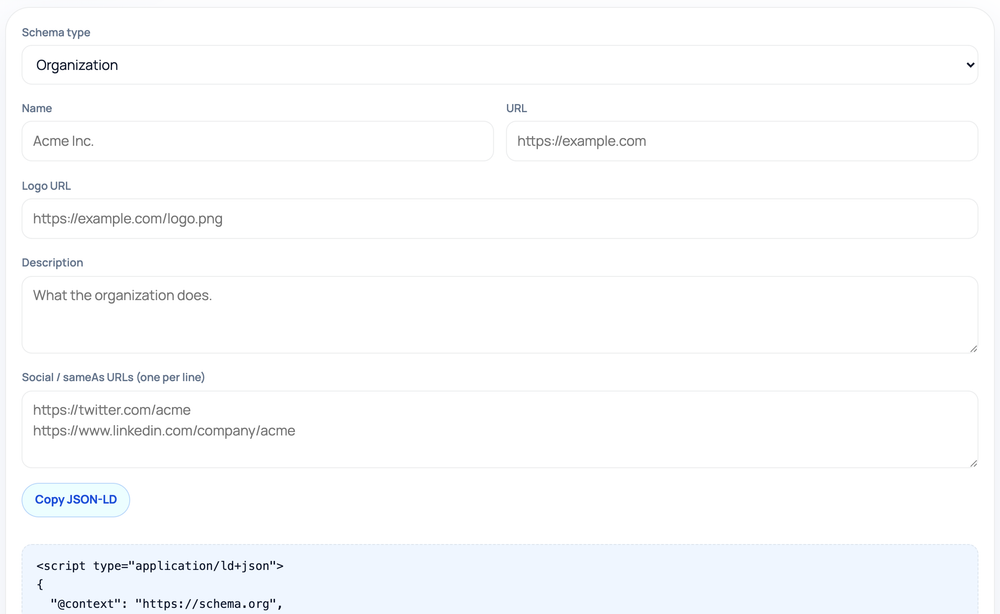
How to use the Schema Markup Generator — tool screenshot
The Schema Markup Generator on HighSEOTools

Pro tip: Always run the copied JSON-LD through Google's Rich Results Test before publishing to confirm it's valid.

Structured data without the syntax pain

Search engines understand a page better when you label its parts explicitly: this is a recipe, that is the cook time, here is the author. Schema.org is the shared vocabulary for those labels, and JSON-LD is the format Google recommends for declaring them.

Hand-writing JSON-LD is fiddly — one stray comma or mismatched bracket and the whole block is ignored. This generator lets you choose a type, fill in plain fields, and receive a structurally valid object instead of wrestling with the braces yourself. It also adds the right nested objects for you, such as wrapping an author in a Person and an address in a PostalAddress.

Supported types

  • Organization and Local Business for company and storefront identity
  • Website for a sitelinks search box
  • Article for blog posts and news, and Person for author or profile pages
  • Product and Review for commerce pages, including ratings
  • FAQ Page and Breadcrumb List for SERP enhancements
  • Event, Recipe, and Video Object for specialized content

How it produces the JSON-LD

You select a type and the form shows the relevant fields for it; as you fill them in, the tool emits a JSON-LD object with the correct @context and @type and your values mapped to the right properties. It runs entirely in your browser, so no data leaves the page.

Optional fields are only included when you complete them, and the tool builds the nested structures Google expects — a LocalBusiness address becomes a PostalAddress with optional GeoCoordinates, a Product can carry an Offer and an AggregateRating, and an FAQ page becomes a mainEntity array of Question and Answer pairs. The output is wrapped in a <script type="application/ld+json"> block ready to paste into the head or body.

Where you would use each type

Organization or Local Business markup belongs on a homepage or contact page to establish who you are; a storefront adds an address and opening hours. Article and Person suit a blog, pairing a post with its author. Product, Offer, and Review markup describe an item and its price and rating on a commerce page.

FAQ Page and Breadcrumb List are the quickest wins for SERP enhancements when a page genuinely has questions or a clear navigation path. Event, Recipe, and Video Object are for pages built around those exact things — a listing, a dish, or an embedded video — where the structured fields mirror what visitors already see.

Common mistakes to avoid

The most damaging mistake is marking up content that is not visible on the page — inventing FAQ answers, a star rating, or an event date that a visitor never sees. Google treats that as a structured-data violation and may apply a manual action, so every value must reflect the real, on-page content.

Other frequent slips are choosing a type that does not match the page, leaving out a required property so the block is incomplete, and adding ratings to a Product that has no genuine reviews. When in doubt, mark up less, but mark it up truthfully.

Eligibility versus guarantees

Valid markup makes a page eligible for rich results, but eligibility is not the same as display. Google decides per query whether to show a rich result, and it can ignore markup that contradicts the visible page content or violates its structured-data policies.

The generator validates structure, not truthfulness: it will happily encode a review rating or an event date that does not match your page. Make sure every value genuinely reflects what visitors see, and validate the final block in Google's Rich Results Test before publishing. Privacy note: the fields you enter are processed in your browser and never uploaded.

Worked examples

Markup for three page types

Minimal Organization markup

Input: Type: Organization | name: Acme Tools | url: https://acme.example | logo: https://acme.example/logo.png

Output: A script block containing {"@context":"https://schema.org","@type":"Organization","name":"Acme Tools","url":"https://acme.example","logo":"https://acme.example/logo.png"}.

The @context and @type are added automatically so the object is valid.

An FAQ block for a support page

Input: Type: FAQ Page | Q1: Do you offer refunds? A1: Yes, within 30 days. | Q2: Is there a free trial? A2: Yes, 14 days, no card required.

Output: A FAQPage object with a mainEntity array of two Question entries, each holding an acceptedAnswer — the format Google reads for FAQ rich results.

Only mark up questions and answers that are actually visible on the page.

A product with price and rating

Input: Type: Product | name: Trail Runner 2 | brand: Acme | price: 89.00 | priceCurrency: USD | availability: InStock | ratingValue: 4.6 | reviewCount: 218

Output: A Product object with a nested Offer (price, currency, InStock) and an AggregateRating carrying ratingValue 4.6 across 218 reviews.

Add the rating only if those reviews genuinely appear on the page.

FAQ

Schema Markup Generator FAQ, answered

JSON-LD or microdata — which does this generate?

JSON-LD, the format Google recommends. It lives in a single script block and keeps the structured data separate from your visible HTML.

Which schema types are supported?

Twelve common ones: Organization, Local Business, Website, Article, Product, FAQ Page, Breadcrumb List, Person, Event, Recipe, Review, and Video Object.

Will adding this guarantee a rich result?

No. Valid markup makes a page eligible, but Google chooses per query whether to show a rich result and may skip markup that conflicts with the page.

Where do I paste the script block?

Inside the page, commonly in the head or just before the closing body tag. Either location is fine as long as the block appears on the relevant page.

Can I combine several schema types on one page?

Yes. Generate each type and include multiple script blocks, but only describe content that genuinely appears on that page to stay within Google's guidelines.

How do I confirm it is valid?

Run the generated block through Google's Rich Results Test or the Schema.org validator to catch any property warnings before you publish.

Site standards

How HighSEOTools handles data and methodology

Our editorial and data-source notes explain how each check works and where estimates come from.