Meta Tags Tools

Hreflang Generator

Add one row per language or region version of a page and generate valid rel="alternate" hreflang link tags, including an x-default fallback, so search engines serve the right variant.

Meta Tags ToolsBrowser ready/hreflang-generator

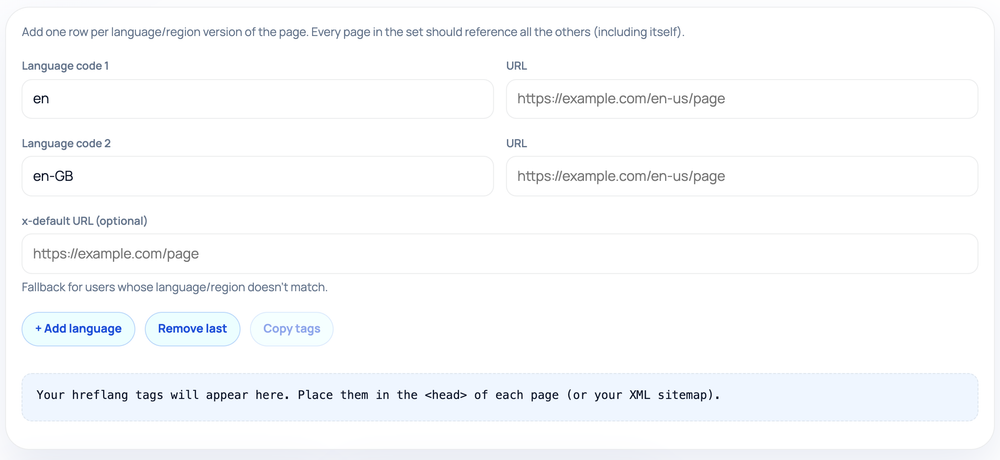
Add one row per language/region version of the page. Every page in the set should reference all the others (including itself).

Your hreflang tags will appear here. Place them in the <head> of each page (or your XML sitemap).
Step by step

How to use the Hreflang Generator

  1. Enter a language-region code (en, en-GB, fr-FR) and its URL per row.
  2. Click + Add language for each extra version of the page.
  3. Optionally add an x-default URL as the fallback for unmatched users.
  4. Click Copy tags and paste the rel=alternate links into each page's head.
How to use the Hreflang Generator — tool screenshot
The Hreflang Generator on HighSEOTools

Pro tip: Every page in the set must list all versions including itself, so paste the same full tag block on every language URL.

What hreflang signals

When a page exists in several languages or regional editions, hreflang tags tell search engines which version belongs to which audience, so a French reader is served the French URL rather than the English one. Done right, it stops localized pages from competing with each other and improves the experience for searchers worldwide.

The catch is that the syntax is unforgiving: codes must be valid, and the set of tags has to agree across every version. A small mistake quietly disables the whole signal, which is why generating the tags from a structured list beats typing them by hand.

How the tags are built

You add one row per version, entering a language code (optionally with a region) and the URL it points to; the tool assembles a matching self-closing <link rel="alternate" hreflang="..." href="..." /> tag for every filled-in row, all in your browser with nothing sent to a server. You can add as many rows as you need and remove the last one as you go.

Language codes follow ISO 639-1 (such as en, es, de) and optional region codes follow ISO 3166-1 alpha-2 (such as en-US, en-GB, pt-BR). Rows missing a code or a URL are simply skipped, so a half-finished row will not produce a broken tag.

The x-default entry

Alongside the per-language rows, the generator has a dedicated field for an x-default entry. This points to the page you want shown when none of your specific language or region versions matches the searcher — typically a language selector or your primary international page.

Including x-default is good practice because it gives search engines a defined fallback instead of guessing for unmatched audiences. It is optional, but adding it removes ambiguity for the many visitors who fall outside your listed locales.

Where to place the tags

  • In the <head> of every language version of the page
  • Or in your XML sitemap as alternate-link annotations
  • Or as HTTP Link headers for non-HTML files such as PDFs
  • Always the same complete set, repeated on every version including itself

Common mistakes to avoid

The most common failure is a non-reciprocal set: the English page lists the German page, but the German page does not list the English one back, so search engines distrust the whole cluster. Forgetting the self-referencing tag — each page should also list its own URL — causes the same problem.

Other frequent errors are using an invalid or made-up region code, swapping the order so it reads region-language instead of language-region, and pointing a tag at a URL that redirects or returns a 404. Any of these can silently switch the signal off.

Where care is still needed

Hreflang must be reciprocal and complete. This tool generates the tag set for one page; you are responsible for placing the corresponding set on every other version so they all reference one another, including each page referencing itself.

It also cannot verify that your codes describe real, live pages or that the URLs resolve. It validates the format and assembles the tags, not whether each href actually exists, so confirm the live implementation after deployment with a crawler or Search Console's international reports. Privacy note: the codes and URLs you enter stay in your browser and are never uploaded.

Worked examples

Sample runs, start to finish

Three regions plus a default

Input: en-US -> https://example.com/us/ | en-GB -> https://example.com/uk/ | de-DE -> https://example.com/de/ | x-default -> https://example.com/

Output: <link rel="alternate" hreflang="en-US" href="https://example.com/us/" /> plus matching en-GB and de-DE tags, and <link rel="alternate" hreflang="x-default" href="https://example.com/" />.

Each of these tags must appear on every listed page for the signal to hold.

Language-only targeting

Input: en -> https://example.com/en/ | es -> https://example.com/es/

Output: Two tags using bare language codes, en and es, with no region. This suits content that varies by language but not by country.

Add a region code only when you genuinely serve different content per country.

FAQ

Hreflang Generator — questions & answers

Do I need a region code, or is language enough?

Language alone (en, es) is fine when content does not vary by country. Add a region (en-US, en-GB) only when you genuinely serve different content per region.

What is x-default for?

It names the fallback URL for searchers whose language or region matches none of your listed versions, such as a language picker or your main international page.

How many languages can I add?

As many as you need. Use the add-language button to insert rows and the remove button to drop the last one; only rows with both a code and a URL produce a tag.

Where do the tags go?

In the head of each page, or alternatively in an XML sitemap or HTTP headers. Wherever you place them, every version must reference every other version, itself included.

Why did my hreflang stop working?

The most common causes are non-reciprocal tags, a missing self-reference, an invalid language or region code, or a referenced URL that redirects or 404s. Confirm each href resolves and that the references are mutual.

Why are the tags self-closing?

The generator writes them as <link ... /> with a trailing slash, which is valid link-tag syntax. The slash is harmless in HTML5 and keeps the output tidy for XML contexts too.

Site standards

How HighSEOTools handles data and methodology

Our editorial and data-source notes explain how each check works and where estimates come from.