Meta Tags Tools

Social Media Preview

Enter your Open Graph values and switch between Facebook, X, and LinkedIn to see how the share card would render, with character checks on the title and description.

Meta Tags ToolsBrowser ready/social-media-preview

Facebook preview

0og:title chars (≤60)
0og:description chars (55–160)

LinkedIn, Slack, and WhatsApp render link previews much like Facebook. For reliable cards, set og:title, og:description, og:image, and (for X) twitter:card = summary_large_image.

Step by step

How to use the Social Media Preview

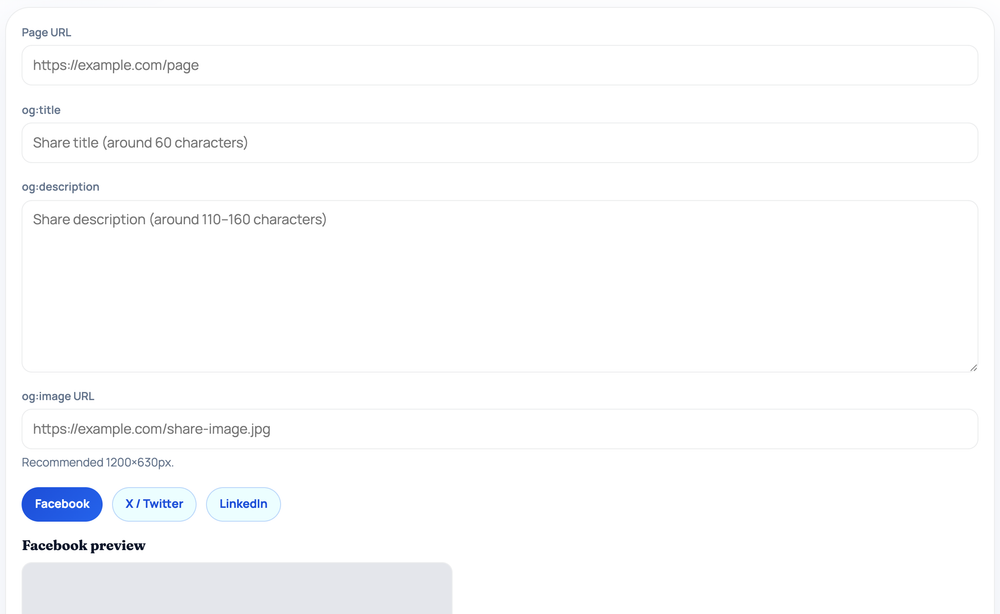
  1. Enter the page URL, og:title, og:description, and og:image URL.
  2. Click Facebook, X / Twitter, or LinkedIn to switch the card style.
  3. Inspect the rendered share card, including image, domain, title, and text.
  4. Read the og:title (<=60) and og:description (55-160) character checks below.
How to use the Social Media Preview — tool screenshot
The Social Media Preview on HighSEOTools

Pro tip: Use a 1200x630px og:image — if it shows 'Image failed to load', the URL is wrong or blocked, and the real card will break too.

Look before you post

A link card looks different on every network: the same title and image are framed, cropped, and trimmed in their own way by Facebook, X, and LinkedIn. This tool mocks each one so you can see those differences before the post is live instead of discovering them afterward.

It turns your Open Graph values into a representative card and lets you flip between platform layouts with a click, which is far faster than publishing a test post just to check how the thumbnail and headline come together.

How the preview is rendered

You provide the Open Graph values — page URL, title, description, and image URL — and the tool draws an approximate share card from them in your browser. Buttons let you switch the mock-up between Facebook, X (Twitter), and LinkedIn framing; X uses a slightly different layout with the domain shown below the text rather than above it.

The image is the one element actually loaded from the web: the tool requests the og:image URL you enter and displays it in the card, falling back to an "Image failed to load" placeholder if the URL is unreachable. The rest of the card is built locally from your text, and the values you type are not sent to any server.

Reading the length checks

Below the card the tool shows live character counts for the title and description with simple guide ranges — around 60 characters or fewer for the og:title and roughly 55 to 160 for the og:description. These are the lengths that tend to display without being awkwardly clipped across the major networks.

Use them to tighten copy so the words that matter survive. A title comfortably under the limit and a description that lands in the suggested band give you the best chance of a clean card on every platform rather than an ellipsis mid-sentence.

Where you would use it

  • Sanity-checking a share card before announcing a page or campaign
  • Comparing how one set of og: values frames across Facebook, X, and LinkedIn
  • Confirming your og:image URL actually loads and crops acceptably
  • Trimming an over-long title or description until it fits the guide ranges
  • Demonstrating to a stakeholder what a shared link will look like

Common mistakes to avoid

The most frequent is an og:image that fails to load because the URL is relative, private, or mistyped — the placeholder will tell you immediately. Another is writing a title for length that reads well in full but gets clipped on the platform you actually care about, so check the count.

People also assume the preview is identical across networks; it is a close guide, not a pixel-exact copy of each platform's current design. And remember that what you enter here is only a mock-up — it does not change the tags on your real page.

Reading it honestly

These are representative mock-ups, not pixel-perfect reproductions. Each network tweaks its card design periodically and applies its own image cropping, so treat the previews as a close guide rather than an exact screenshot of the final post.

The tool renders the values you enter; it does not fetch your live page's existing tags or refresh any platform's cached preview. To confirm the real result, post a test link or use a platform's own sharing debugger after your tags are deployed. Privacy note: your title, description, and URL stay in the browser — only the image URL is requested so the card can display it.

Worked examples

Examples straight from the tool

Catching a title that runs past the guide length

Input: Page URL: https://highseotools.com/serp-snippet-preview | og:title: The Complete, Exhaustive, Step-by-Step Beginner's Guide to International SEO in 2026 | og:description: Everything you need. | og:image: https://highseotools.com/assets/og-image-v2.png

Output: The image loads and the card renders with the domain HIGHSEOTOOLS.COM above the headline. The og:title tile reads 84 and is flagged for exceeding the ≤60 guide; the og:description tile reads 20. Note that the mock card itself prints the title in full — the tile is the warning, and it is the real platforms that clip a headline this long.

The tool flags the length; it does not reproduce each platform's exact cut-off point.

Spotting a broken image URL

Input: og:title: Spring Sale | og:description: 20% off everything this week. | og:image: /images/sale.png

Output: The card shows an "Image failed to load" placeholder because the image path is relative rather than an absolute https:// URL, which scrapers and this preview both need.

Switch to an absolute image URL and the thumbnail appears.

FAQ

Questions we get about Social Media Preview

Does this fetch my page's existing tags automatically?

No. You enter the Open Graph values and it renders the preview from them. To pull tags from a live URL instead, use the Open Graph Checker.

Can I see all three platforms at once?

You switch between them with the Facebook, X, and LinkedIn buttons, viewing one layout at a time. Each uses its own framing so you can compare them quickly.

Are the previews exactly what each platform shows?

They are close approximations. Networks adjust their card layouts over time, so use the mock-ups as a reliable guide, then confirm with a real test post.

Why does my image show "failed to load"?

The tool loads the og:image URL directly. If it is relative, private, or mistyped, it cannot be fetched, so use an absolute, publicly reachable https:// URL.

Why does my description show a warning count?

It is outside the suggested 55 to 160 character band, so the end may be truncated on some platforms. Adjust it until the count lands inside the range to keep your message visible.

Which platforms does it model?

Facebook, X (Twitter), and LinkedIn — the three most common destinations for shared links. The hint also notes that Slack and WhatsApp render previews much like Facebook.

Site standards

How HighSEOTools handles data and methodology

Our editorial and data-source notes explain how each check works and where estimates come from.