Meta Tags Tools

Meta Tag Generator

Fill in a handful of fields and get a copy-ready block of head tags: the SEO title, meta description, keywords, author, a robots directive, and optional charset and viewport tags — all built in your browser.

Meta Tags ToolsBrowser ready/meta-tag-generator
<meta charset="UTF-8">
<meta name="robots" content="index, follow">
<meta name="viewport" content="width=device-width, initial-scale=1">
Step by step

How to use the Meta Tag Generator

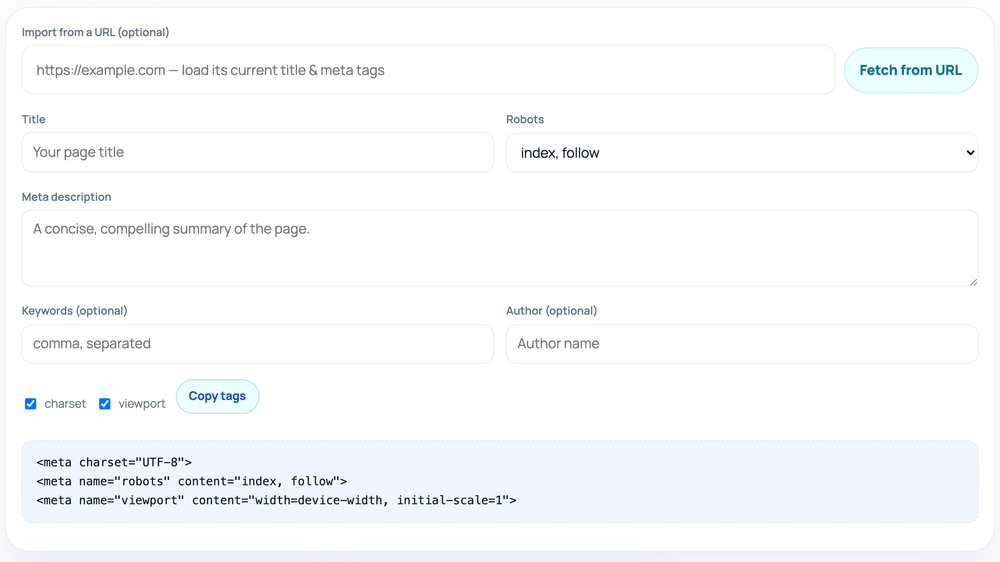
  1. Optional: paste a URL and click "Fetch from URL" to import current tags
  2. Fill in title, meta description, keywords, author, and robots
  3. Toggle the charset and viewport checkboxes as needed
  4. Click "Copy tags" and paste the output into your page <head>
How to use the Meta Tag Generator — tool screenshot
The Meta Tag Generator on HighSEOTools

Pro tip: Watch the live length hints — keep the title at 30–60 and description at 70–160 characters.

What this tool puts in your <head>

Every HTML page leans on a small set of head tags that browsers and search engines read before they render or rank anything. Typing them by hand is repetitive, and a single missing quote or angle bracket can break the whole tag silently. This generator removes that friction: you fill in plain fields and it returns correctly-formed markup.

The block it produces covers the everyday essentials — a <title> element, a meta description, optional meta keywords and author tags, a robots directive, and two structural tags you can toggle on or off: the UTF-8 charset declaration and the responsive viewport tag. It writes only the tags that depend on the values you supply, so empty fields are skipped rather than left as blank, useless markup.

How the output is assembled

Everything happens locally. As you type, each field is slotted into a tag template and the markup is rebuilt instantly — there is no server round-trip, no account, and no rate limit. You can iterate on wording and watch the output change line by line.

The title becomes the <title> element and the description becomes the standard meta description. Keywords and author are written as their respective name-based meta tags only when you provide them. The robots dropdown writes a single robots meta tag using the combination you choose. The charset and viewport checkboxes add <meta charset="UTF-8"> and the width=device-width viewport tag, which together keep the page parsing correctly and rendering well on phones.

The title and description fields also show a live length hint, nudging you toward roughly 30 to 60 characters for the title and 70 to 160 for the description — the ranges that tend to display cleanly in search results without being cut off.

Where you would use it

  • Bootstrapping the head of a brand-new static HTML page or landing page
  • Generating consistent tags for a batch of pages you are hand-coding
  • Teaching or demonstrating what a correct set of head tags looks like
  • Setting a single page to noindex while you stage or test it
  • Producing a clean reference block to compare against what your CMS outputs

Tips for stronger tags

Front-load the words that matter in your title, because that is where both readers and search engines look first. Write the description as a genuine, benefit-led summary rather than a list of keywords — it is marketing copy that influences click-through, not a ranking lever.

Leave the keywords field empty for most pages. Google has ignored the meta keywords tag for ranking purposes for many years, and stuffing it adds nothing. It is included here for the rare cases where an internal search system or a legacy platform still reads it.

Keep charset and viewport switched on for any modern web page. They are not SEO copy, but a missing viewport tag is a common reason a site is judged non-responsive, and an absent charset can cause character-encoding glitches.

Common mistakes to avoid

The biggest trap is leaving a noindex robots value in place after you finish staging a page — it quietly keeps the URL out of search results. Double-check the robots dropdown reads index, follow before you publish anything you want found.

Another is treating the description as a keyword dump. Search engines frequently rewrite weak or stuffed descriptions, so you lose control of your own snippet. Finally, do not paste the same title and description across many pages; near-duplicate metadata makes it harder for search engines to tell your pages apart.

Where it stops

This generator writes correct, well-formed tags from what you give it, but it cannot judge whether your description is compelling or whether the title matches search intent — those are editorial calls only you can make.

It is deliberately scoped to core meta tags. It does not produce canonical link tags, Open Graph tags, or Twitter Card tags; for those, use the dedicated Open Graph Generator and Twitter Card Generator on this site. It also cannot confirm that the page renders the tags intact once your theme or CMS processes them, so verify the result on the live URL.

Privacy note: because the tool runs entirely in your browser, the title, description, and other values you enter are never transmitted anywhere — they exist only on the page in front of you.

Worked examples

A head section, built to spec

A blog post head block

Input: Title: How to Compress Images Without Losing Quality | Description: A step-by-step guide to shrinking JPEG and PNG files while keeping them sharp. | Robots: index, follow | charset and viewport: on

Output: <meta charset="UTF-8"> then <title>How to Compress Images Without Losing Quality</title>, <meta name="description" content="A step-by-step guide to shrinking JPEG and PNG files while keeping them sharp.">, <meta name="robots" content="index, follow">, and <meta name="viewport" content="width=device-width, initial-scale=1">.

Empty optional fields (keywords, author) are simply omitted.

Staging a page so it stays out of search

Input: Title: Internal Pricing Calculator (Draft) | Robots: noindex, nofollow | charset and viewport: on

Output: A <title> tag plus <meta name="robots" content="noindex, nofollow">, which asks search engines to keep the page unindexed and not to follow its links while you finish it.

Remember to switch robots back to index, follow before launch.

FAQ

Questions we get about Meta Tag Generator

Do I need to paste my whole page in?

No. You only fill in the values — title, description, keywords, author, and the robots, charset, and viewport options. The tool writes the surrounding tag syntax for you.

Where do I put the generated tags?

Inside the <head> element of the page, ideally near the top before any large blocks of inline script so crawlers reach them early.

Does it generate Open Graph or canonical tags?

No. It focuses on core meta tags. For social-preview markup use the Open Graph Generator and Twitter Card Generator; both are free tools on this site.

Should I fill in the keywords field?

Usually not. Google ignores the meta keywords tag for ranking, so it is optional and best left blank unless a legacy or internal system specifically reads it.

Can it set a page to noindex?

Yes. Choose the noindex option in the robots dropdown and the robots meta tag is written as noindex, asking search engines to keep that URL out of their results.

Why does the title field show a character range?

It is a live length hint pointing at roughly 30 to 60 characters, the range that tends to display fully in search results. It is guidance, not a hard limit, so you can go outside it.

Is anything I type sent to a server?

No. The tool runs fully client-side, so your inputs never leave your browser and there is no account or upload involved.

Site standards

How HighSEOTools handles data and methodology

Our editorial and data-source notes explain how each check works and where estimates come from.