
XML Sitemaps: What They Are and How to Create One
An XML sitemap is a machine-readable file — normally at /sitemap.xml on your domain — listing the pages you want search engines to index. It exists to solve one specific problem: search engines discover pages mainly by following links, so a page with few links pointing at it can go unnoticed; the sitemap hands crawlers your full list of URLs directly, so discovery no longer depends on how well each page is linked.
Part 5 of 12 in the HighSEOTools SEO learning path.
What a sitemap actually looks like
Two quick definitions in case you're joining the path here: a crawler is the program a search engine uses to download web pages (Google's is called Googlebot), and the index is the searchable database of pages it has downloaded and processed. Part 3 and Part 4 covered the ways crawling goes wrong; the sitemap is the positive channel — telling crawlers what to fetch.
Rather than describe the format abstractly, here is the top of this site's own live sitemap, fetched from https://highseotools.com/sitemap.xml (checked 2026-07-17; the full file lists 83 URLs):
<?xml version="1.0" encoding="UTF-8"?>
<urlset xmlns="http://www.sitemaps.org/schemas/sitemap/0.9">
<url>
<loc>https://highseotools.com/</loc>
<lastmod>2026-07-03T00:00:00.000Z</lastmod>
<changefreq>daily</changefreq>
<priority>1</priority>
</url>
<url>
<loc>https://highseotools.com/tools</loc>
<lastmod>2026-06-18T00:00:00.000Z</lastmod>
<changefreq>monthly</changefreq>
<priority>0.7</priority>
</url>
...</urlset>
A <urlset> wrapper, then one <url> block per page with up to four tags — and the four are not equally important:
- <loc> — the page's full address. The only required tag, and the one that does the real work.
- <lastmod> — when the page last meaningfully changed. Google says it uses this field when it has proven consistently accurate on your site. Keep it truthful or leave it out: a sitemap whose every URL claims to have changed today teaches crawlers to distrust the field.
- <changefreq> and <priority> — hints about update frequency and relative importance. Google has said publicly that it ignores both. They're valid XML and do no harm (as you can see, our own sitemap still carries them), but don't spend any time tuning them.
What a sitemap can and cannot do
Be clear about the contract. A sitemap helps crawlers find pages sooner and more completely — which matters most on new sites with few backlinks, large sites with thousands of URLs, and deep pages with weak internal linking. It does not guarantee indexing (Google still decides whether each page is worth storing), it cannot override a noindex tag or a canonical pointing elsewhere, and being in a sitemap is not a ranking boost. Think of it as a courtesy map, not a command.
What belongs in it — and what doesn't
Include only pages that are canonical (the preferred address when several URLs show the same content — Part 2 covered the canonical tag), indexable (not marked noindex), and served with a 200 status (the "page exists" server response from Part 3). Exclude redirects, noindexed pages, duplicate variants, and low-value utility pages like thank-you screens or internal search results.
The reason is that a sitemap is a statement — "these are the URLs I want indexed" — and every entry that contradicts your own site undermines it. If Google fetches a sitemap URL and finds a redirect or a noindex tag, your map just gave a wrong direction. A short, clean sitemap is more useful (to crawlers and to you, as you'll see in the diagnostics section) than a bloated one.
Three ways to create one
- CMS plugins — WordPress (via plugins like Yoast or Rank Math, and a basic one in core), Shopify, Wix and similar platforms generate and update sitemaps automatically. If this is you, your job is only to check the output, not to build anything.
- Framework builds — most web frameworks can emit a sitemap from your routes or content at build time, which keeps it automatically in sync. This site's sitemap is generated that way.
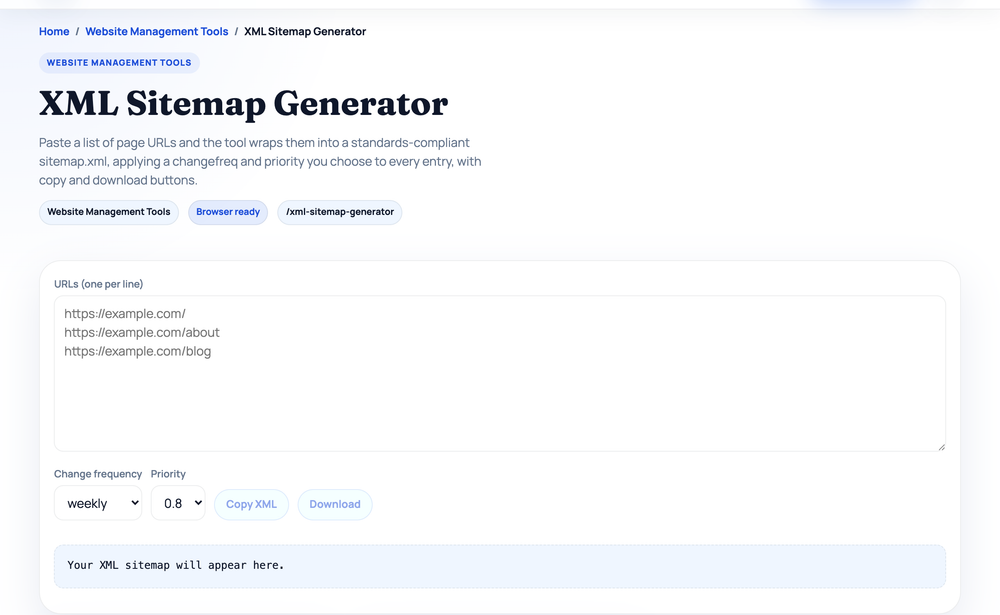
- A generator tool — for small or hand-built sites, paste your URLs into the XML Sitemap Generator, one per line, pick a changefreq and priority (applied to the whole list), and copy or download the result as sitemap.xml. Pasting the three example URLs with the defaults (weekly / 0.8) produces exactly:
<?xml version="1.0" encoding="UTF-8"?>
<urlset xmlns="http://www.sitemaps.org/schemas/sitemap/0.9">
  <url>
    <loc>https://example.com/</loc>
    <changefreq>weekly</changefreq>
    <priority>0.8</priority>
  </url>
  <url>
    <loc>https://example.com/about</loc>
    <changefreq>weekly</changefreq>
    <priority>0.8</priority>
  </url>
  <url>
    <loc>https://example.com/blog</loc>
    <changefreq>weekly</changefreq>
    <priority>0.8</priority>
  </url>
</urlset>
Note the generator doesn't emit lastmod — deliberately, since a hand-pasted date is exactly the kind of unreliable lastmod Google learns to ignore. If your build system knows real modification dates, include them there.
How search engines find your sitemap
Three discovery routes, and it's worth using all of them:
- Google Search Console — under Indexing → Sitemaps, enter
sitemap.xmland submit. (Search Console, Google's free site-owner dashboard, gets its own guide in Part 11.) You do this once; Google re-fetches the file on its own afterwards. - Bing Webmaster Tools — same idea, under Sitemaps.
- A Sitemap line in robots.txt — robots.txt (the crawler-rules file from Part 4) can carry a line like
Sitemap: https://yoursite.com/sitemap.xml, which every major crawler reads automatically.
That robots.txt line is more than a formality. Our Robots.txt Generator can import a live site's robots.txt, and running that import against two long-established sites shows why (real output, checked 2026-07-17):
gnu.org           → Sitemap: http://www.gnu.org/sitemap.xml
en.wikipedia.org  → Sitemap: https://en.wikipedia.org/w/rest.php/site/v1/sitemap/0
Wikipedia's sitemap doesn't live at /sitemap.xml at all — it sits behind an API path no crawler would guess. The robots.txt line is precisely how crawlers still find it. And notice GNU declares its sitemap with an http:// address even though the site serves over https — it works, but declaring the canonical https URL would be cleaner. Small real-world wrinkles like these are why it pays to check your own file rather than assume.
When one file isn't enough: sitemap indexes
A single sitemap is capped at 50,000 URLs and 50MB uncompressed (you may serve it gzip-compressed to save bandwidth; the limits apply to the unzipped file). Past that — or simply to stay organised — you split URLs across several sitemaps and list them in a sitemap index: a sitemap of sitemaps. GNU's is a real, minimal example — https://www.gnu.org/sitemap.xml returns (checked 2026-07-17):
<?xml version="1.0" encoding="UTF-8"?>
<sitemapindex xmlns="http://www.sitemaps.org/schemas/sitemap/0.9">
<sitemap>
  <loc>http://www.gnu.org/sitemap0.xml.gz</loc>
</sitemap>
</sitemapindex>
That one child file, once unzipped, is a normal <urlset> containing 5,253 URLs. Larger sites usually split by content type — posts, pages, products — which pays off in diagnostics: if Search Console reports your "products" sitemap has far fewer indexed URLs than submitted, you know exactly where to look.
The indexing gap: your sitemap as a diagnostic
Once submitted, the sitemap becomes your best measuring stick. Search Console's Sitemaps report shows how many of the submitted URLs Google discovered, and the Indexing → Pages report explains why individual URLs aren't indexed — noindex, duplicate, redirect, or "crawled – currently not indexed" (Google saw the page and chose not to store it, usually a content-quality signal). If you submit 200 URLs and 120 are indexed, that 80-page gap is the most valuable to-do list on your site. This is the practical payoff of keeping the sitemap clean: when it contains only canonical, indexable, 200-status URLs, every gap points at a real problem instead of noise you added yourself.
Checking one page end-to-end
A workflow you can run on any URL that should be indexed but isn't:
- Is it in the sitemap? Open yoursite.com/sitemap.xml in a browser and search the source (Ctrl+F) for the page's path. Missing? Add it to your generator input or your next build.
- Is it crawlable? Paste your robots.txt into the Robots.txt Tester with the page's path and "Googlebot" as the crawler — it answers Allowed or Blocked and shows the exact rule that decided. A sitemap entry cannot override a robots.txt block.
- What does Google say? In Search Console, Indexing → Pages, find the URL's status: indexed, duplicate, noindexed, or crawled-but-not-indexed.
- Spot-check the page. Use Search Console's URL Inspection on it: canonical should point to itself (or be absent), no noindex in the meta robots tag, and a 200 response — not a 404 or a redirect.
If all four checks pass and the page still isn't indexed after a couple of weeks, the sitemap isn't the problem — content quality or search demand usually is, and no amount of resubmitting will change that.
Two final habits
Don't confuse XML with HTML sitemaps. The XML file is for machines; an HTML sitemap is an ordinary page of links for human visitors. Both are legitimate, but only the XML one does the discovery job described here — the HTML kind is an optional usability extra on large sites.
Keep it fresh automatically. The commonest sitemap failure is staleness: a file still listing pages deleted months ago, or missing everything published since. Generate it from your live content so publishing and deleting pages updates it for free; if you maintain it by hand, make "update the sitemap" part of your publishing checklist and resubmit in Search Console after major changes.
Next in the learning path: with discovery handled, the next constraint is speed — how fast your pages load and how stable they feel, measured by Google as field data from real visitors. That's Part 6: Core Web Vitals.
Sources and official references
Use these external references to verify the guidance and terminology in this article.
Frequently asked questions
Do I really need an XML sitemap?
Small, well-linked sites can rank without one, but a sitemap helps search engines discover pages faster and more completely. For new or large sites it's strongly recommended.
Where should my sitemap live?
Most sites use /sitemap.xml at the root. Reference it in robots.txt and submit it in Google Search Console and Bing Webmaster Tools.
How often should I update it?
Ideally it updates automatically whenever you publish or change pages. If you maintain it manually, refresh it after any significant content change.