Website Management Tools

XML Sitemap Generator

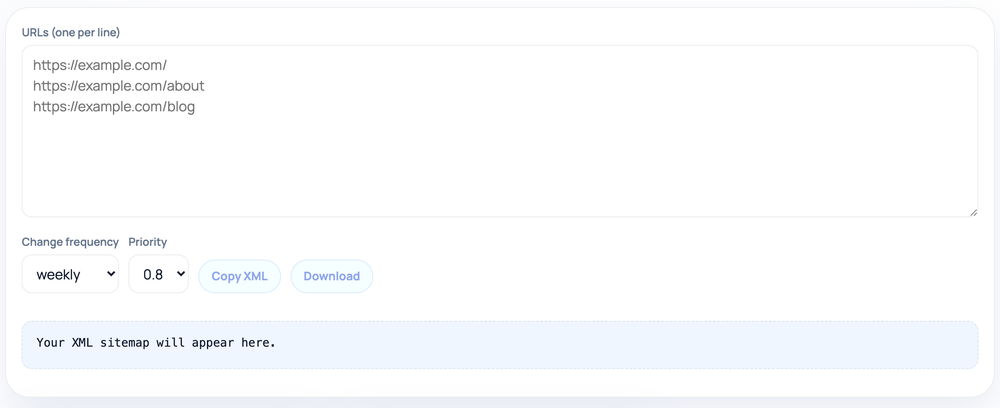
Paste a list of page URLs and the tool wraps them into a standards-compliant sitemap.xml, applying a changefreq and priority you choose to every entry, with copy and download buttons.

Website Management ToolsBrowser ready/xml-sitemap-generator
Your XML sitemap will appear here.
Step by step

How to use the XML Sitemap Generator

  1. Paste your URLs into the box, one full URL per line
  2. Pick a change frequency and priority from the dropdowns
  3. Read the generated <urlset> XML preview that appears below
  4. Click Copy XML or Download to save sitemap.xml
How to use the XML Sitemap Generator — tool screenshot
The XML Sitemap Generator on HighSEOTools

Pro tip: Upload the file to your site root and submit it in Google Search Console for faster discovery.

From a URL list to valid XML

A sitemap is an XML document that lists the pages you want search engines to discover, each inside a <url> element with a required <loc>. This generator reads one URL per line, trims blank lines, and produces a complete file with the correct XML declaration and the sitemaps.org namespace on the <urlset> root. Special characters that would break the XML — ampersands and angle brackets — are escaped inside each <loc>, so URLs with query strings stay valid. The result is ready to save as sitemap.xml and reference from robots.txt or submit in Search Console.

Output appears live as you paste or edit the list. Use the Copy button to grab the XML, or the Download button to save it straight to a file named sitemap.xml.

The changefreq and priority settings

Two dropdowns control the optional hints. changefreq (always, hourly, daily, weekly, monthly, yearly, never) suggests how often a page changes, and priority (from 1.0 down to 0.3) suggests its relative importance. An important detail about this tool: whatever you pick is applied uniformly to every URL in the list — it writes the same <changefreq> and <priority> on each <url> block rather than letting you set them per page. Both are advisory anyway; modern crawlers largely treat them as weak signals and may ignore them entirely, so uniform values are perfectly acceptable.

There is no lastmod field in this generator. lastmod is the field search engines actually pay attention to, since it helps them prioritize re-crawling, so if you need accurate per-page last-modified dates you will add them by hand or use a sitemap your CMS produces. For discovery — simply telling crawlers which URLs exist — the file this tool builds is complete and valid without lastmod.
What it does and does not do

  • It builds well-formed XML from the exact URLs you paste — it does not crawl your site to discover URLs for you.
  • It does not verify that each URL returns a 200 status or that the page is indexable.
  • It applies one changefreq and one priority to the whole list; per-URL values are not supported.
  • It does not emit <lastmod>; add it manually if you need accurate modification dates.

Practical boundaries

  • The sitemaps protocol caps a single file at 50,000 URLs and 50 MB uncompressed; very large sites need multiple files tied together by a sitemap index.
  • Only canonical, indexable URLs belong here — including redirects, noindex pages, or robots-blocked paths sends mixed signals and wastes crawl budget.
  • List absolute URLs with the scheme and host; relative paths are not valid sitemap entries.
  • Keep the list in sync with your real pages — a sitemap full of dead or redirected URLs trains crawlers to trust it less.

Privacy note

Generation happens entirely in the browser from the text you paste, so private, internal, or staging URLs never leave your machine during the build — there is no server round-trip. That makes it safe to prepare a sitemap for an unreleased site, though you should still keep the finished file off a public path until you are ready for it to be found.

Worked examples

Typical inputs, typical outputs

Three URLs at weekly / 0.8

Input: https://example.com/\nhttps://example.com/about\nhttps://example.com/blog (changefreq weekly, priority 0.8)

Output: A full <urlset> with three <url> blocks, each like <loc>https://example.com/</loc><changefreq>weekly</changefreq><priority>0.8</priority>, wrapped in the XML declaration and sitemaps.org namespace.

The same changefreq and priority are written on every entry.

A URL with an ampersand

Input: https://example.com/search?q=shoes&sort=price

Output: <loc>https://example.com/search?q=shoes&amp;sort=price</loc>

The & is escaped to &amp; so the XML stays valid.

FAQ

XML Sitemap Generator FAQ, answered

How many URLs can one sitemap hold?

Up to 50,000 URLs or 50 MB uncompressed, whichever comes first. Beyond that, split the URLs into several sitemaps and list them in a sitemap index file.

Can I set a different priority for each URL?

Not in this tool. It applies the changefreq and priority you choose to every URL in the list. If you need per-page values, edit the XML after generating or use a CMS-generated sitemap.

Why is there no lastmod option?

This generator focuses on producing a valid URL list quickly and does not emit <lastmod>. It is the field crawlers use most, so add it manually if accurate change dates matter for your site.

Do changefreq and priority change my rankings?

No. They are crawl hints, not ranking factors, and most search engines treat them loosely. They are safe to leave at sensible defaults.

Should I include redirected or noindex pages?

No. List only canonical pages you want indexed. Including redirects or noindex URLs wastes crawl budget and sends contradictory signals.

How do search engines find the file?

Add a Sitemap line to robots.txt pointing at its absolute URL, submit it in Google Search Console or Bing Webmaster Tools, or both.

Site standards

How HighSEOTools handles data and methodology

Our editorial and data-source notes explain how each check works and where estimates come from.