Local SEO: How to Rank in Your City
Local SEO is the work of making your business visible when nearby people search for what you offer — "emergency plumber", "dentist near me", "coffee shop open now". If you serve customers in a specific city or area, it is usually the highest-return search work you can do, because Google runs a largely separate ranking system for these searches, built around a free listing called your Google Business Profile rather than around your website alone.
Part 10 of 12 in the HighSEOTools SEO learning path.
The map pack: where local visibility lives
Search for a service with local intent and the results page — the SERP (search engine results page) — usually shows a map with three business listings under it, above the ordinary web results. This cluster is the local map pack (also called the "local pack"). Each listing shows a name, star rating, category, and buttons to call or get directions — all drawn not from the businesses' websites but from their profiles on Google.
A Google Business Profile (GBP, formerly Google My Business) is the free listing that represents a business across Google Search and Google Maps: name, hours, photos, reviews, directions. It is what makes you eligible to appear in the map pack at all, which is why roughly half of this guide is about tending it. Your website still matters — it backs up the profile and catches the searches that resolve to ordinary web results — but in local search, the profile is your storefront.
How Google picks the three: relevance, distance, prominence
Google's own documentation says local results are ranked mainly by three factors, and every task in this guide serves one of them:
- Relevance — how well your profile matches what was searched. Driven by your categories, services, description, and overall completeness.
- Distance — how far you are from the searcher or from the place named in the search. You cannot optimise this one, and it is why two businesses doing identical work see different results across town.
- Prominence — how well-known Google believes you are: review quantity and quality, mentions of your business around the web, and the general link-authority signals covered in Part 9.
Distance carries an honest caveat worth stating up front: local rankings vary block by block. Someone searching two streets from your shop sees a different pack than someone across the city, so there is no single "position" for a local business — only positions from particular places.
Your Google Business Profile, field by field
Claim and verify it
Search Google for your business name. If a profile already exists (Google often auto-creates them from public data), look for the option to claim or manage it; if nothing appears, create one from Google's Business Profile interface. Either way you must verify ownership — prove to Google you genuinely represent the business — before you can fully edit what searchers see. Depending on business type and location, Google offers verification by postcard, phone, email, or video. Until this is done your control is limited, so treat it as the first real milestone, and enter the address carefully: changing it later typically triggers re-verification.
Complete every field, starting with NAP
Once verified, fill in everything. Complete, accurate profiles are easier for Google to match to searches, and partial ones leave customers guessing. Pay closest attention to your NAP — name, address, phone number. Enter your business name exactly as it appears in the real world, with no extra keywords or city names stuffed in (that violates Google's guidelines and risks suspension). Use one consistent address format and, where possible, a local phone number.
Then choose a precise primary category for your core business and relevant secondary categories for the rest. Categories carry heavy weight in deciding which searches you are relevant for — a miscategorised profile can be invisible even when everything else is done well — so pick thoughtfully rather than ticking everything that looks close. Set accurate hours including holidays; if you travel to customers instead of serving them at a storefront (a service-area business), define the regions you actually cover. Finally, review the attributes Google offers — wheelchair access, parking, online appointments — so the right customers can self-select.
Write an honest description and add real photos
The description is a short summary of what you do and who you serve. Write it for people, in plain language: your specialties, your history, what makes working with you straightforward. Skip keyword stuffing and inflated claims — a clear, genuine description reads naturally to both searchers and Google.
Photos do more than decorate. A profile with a recognisable logo, a strong cover image, and real photos of your storefront, team, and work feels trustworthy; a profile with one stock photo looks abandoned. A restaurant should show dishes, a contractor finished projects. Refresh them occasionally so the profile matches how the business looks today.
Stay active: Posts, Q&A, products and services
Three profile sections reward ongoing attention. Google Posts are short updates published directly on your listing — offers, events, seasonal reminders — that signal an active business and give searchers a timely reason to choose you. The Q&A section lets anyone ask a public question on your profile and lets anyone answer, so monitor it, respond promptly, and seed it yourself with the questions customers actually ask you. The products and services sections let you list what you offer with descriptions and often prices — keep them current so nobody is surprised by outdated offerings.
Reviews: the prominence signal you can influence
Reviews are among the strongest trust signals on a profile: Google states that more reviews and positive ratings can improve local ranking, and they heavily sway whether searchers pick you over the listing next to yours. Ask satisfied customers for honest feedback and make it easy with a direct review link. Never buy reviews or post fake ones — it violates Google's policies, and it erodes credibility the moment a reader senses it.
Replying matters as much as collecting. Thank people for positive reviews; answer criticism calmly and constructively. A composed reply to a negative review reassures the next ten readers far more than the complaint worries them. Aim to respond to every review, good or bad.
NAP consistency and citations
Your profile does not exist in isolation. A citation is any mention of your business — usually the NAP — on another website: directories like Yelp or Justdial, review platforms, industry associations, the local chamber of commerce. Google cross-checks these, and consistency is the point: when your name, address, and phone match everywhere, your information reads as reliable; when one directory has an old number and another spells the street differently, it creates doubt.
Practical approach: pick one canonical NAP format, use it on your website (footer and contact page), your profile, and every listing. Build citations on the platforms your customers actually use — the major review sites plus your industry's own directories — rather than blasting hundreds of low-quality submissions. A few dozen accurate citations beat hundreds of sloppy ones, and the same quality-over-quantity logic applies to link building generally.
LocalBusiness schema on your website
Structured data (covered in depth in Part 7) is machine-readable code, usually in a format called JSON-LD, that states facts about a page explicitly instead of leaving search engines to infer them. For a local business, a LocalBusiness block on your homepage or contact page confirms your name, address, phone, hours, and coordinates in a form crawlers parse without guesswork. Be clear about what it does: it reinforces and disambiguates your business data — it does not, by itself, place you in the map pack, which runs on your profile.
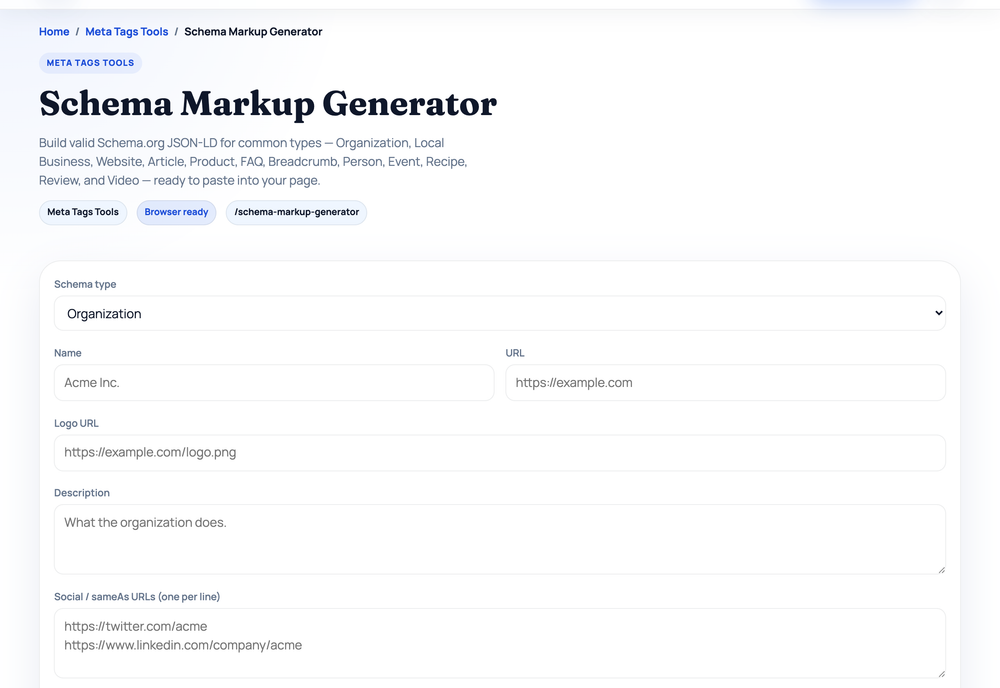
You do not need to hand-write JSON-LD. Our Schema Markup Generator runs entirely in the browser: select the "Local Business" type, type your details into the form, and it builds the markup as you type, omitting any field you leave blank. Take a fictional Manchester plumber — business name "Best Plumbing Ltd", street address "42 Chapel Street", city "Manchester", postcode "M1 5JZ", country "GB", phone "+44 161 234 5678", price range "££", opening hours "Mo-Fr 08:00-18:00", coordinates 53.4808 / -2.2426, and a one-line description. The tool outputs exactly this (generated with the tool's build logic, 2026-07-17):
<script type="application/ld+json">
{
  "@context": "https://schema.org",
  "@type": "LocalBusiness",
  "name": "Best Plumbing Ltd",
  "url": "https://example.com",
  "description": "Emergency plumbing and boiler repair across Manchester.",
  "telephone": "+44 161 234 5678",
  "priceRange": "££",
  "address": {
    "@type": "PostalAddress",
    "streetAddress": "42 Chapel Street",
    "addressLocality": "Manchester",
    "postalCode": "M1 5JZ",
    "addressCountry": "GB"
  },
  "openingHours": [
    "Mo-Fr 08:00-18:00"
  ],
  "geo": {
    "@type": "GeoCoordinates",
    "latitude": "53.4808",
    "longitude": "-2.2426"
  }
}
</script>
Copy the block into your page's <head> (or anywhere in the HTML), with the values matching your canonical NAP exactly — schema that contradicts your profile defeats its own purpose.
A site that works on a phone at the roadside
Much local searching happens on phones, often at the exact moment of need — a burst pipe, a dead car battery, "open now". When someone taps through from your profile to your website, the page has to work on a small screen. Our Mobile-Friendly Test fetches any public page plus up to six of its linked stylesheets and scores seven mobile-readiness signals. Here is the true result for a neutral public page, iana.org's "Example domains" help page (checked 2026-07-17):
Mobile score        88/100 — Mobile-friendly
Viewport tag        pass   Present
Responsive CSS      pass   65 media queries
Responsive media    pass   15 CSS hints
Fixed-width clues   warn   1 fixed-width clue
Heavy embeds        pass   0 iframes
Table layout        warn   1 table
Touch controls      pass   28 interactive controls
The two warnings show how the tool teaches: a fixed pixel width and an unwrapped table are exactly the things that force sideways scrolling on a phone. Run it on your own homepage; if the score is low, the fixes belong to the technical work in Part 3.
Local content and local links
Beyond the profile, publish pages that genuinely serve your area: a page per real service, guides to local regulations or costs, answers to the questions people in your city actually ask. What to avoid has a name — doorway pages, near-identical pages that only swap the city name ("Plumber in Salford", "Plumber in Bolton"…) with nothing locally true on them. Google's spam policies target these directly; a page for a location should exist only if you can say something specific about serving it.
Links and mentions from local organisations — news sites, sponsorships, suppliers, business associations — feed the prominence factor and are natural byproducts of being part of a local economy. A few of these tend to help more than piles of generic directory links.
The 30-minute local audit
Everything above condenses into a repeatable check-up. It takes 20–30 minutes; repeating it quarterly is usually enough to catch drift before it costs customers.
- View your profile as a customer. Search your business name on Google Maps. Does the cover photo load cleanly? Are today's hours right? Does the primary category match what you actually do? Fewer than five quality photos means the profile looks neglected — add more.
- Cross-check your NAP. Copy the name, address, and phone exactly as the profile shows them, then compare against your website footer, social profiles, and the directories you are listed in. "Ave" versus "Avenue", an old number, a different postcode format — fix every mismatch to one canonical form.
- Interrogate your primary category. Ask: would I find this business by searching that category term locally? If not, change it. Miscategorisation is the quietest way to be invisible.
- Read the Q&A and Posts sections. Answer anything unanswered, correct anything wrong, and if the last post is weeks old, write one now.
- Scan reviews for patterns and reply to stragglers. If several customers praise something you don't advertise, add it to your services; if several flag the same weakness, that's an operations note, not an SEO one. Respond to any review still waiting.
- Verify your website's local signals. Confirm the NAP in your footer matches the profile, your
LocalBusinessschema (above) is present and accurate, and the homepage passes the Mobile-Friendly Test. A broader 19-check read comes from the Website SEO Score Checker. - Spot-check rankings from where customers are. Search your core "service + city" terms from within your service area (an incognito window reduces personalisation) and note whether you appear in the pack. Because results shift with the searcher's location, treat this as a trend line, not a scoreboard.
Mistakes that quietly cost customers
- Keyword-stuffing the business name ("Best Plumbing Ltd – Emergency Plumber Manchester 24/7") — it breaks Google's guidelines and risks profile suspension.
- Forgotten listings with stale NAP — one old phone number on a directory you abandoned years ago undermines the consistency of all the rest.
- Ignoring negative reviews — silence reads as indifference to every future customer who scrolls past the complaint.
- Doorway "city pages" — swapping place names into a template invites spam-policy trouble instead of rankings.
- Set-and-forget profiles — hours that lapse at the first holiday, services that no longer exist. Outdated information silently costs visits long before it costs rankings.
What to honestly expect
Local SEO is high-value work, but it is not a switch. Results depend on relevance, distance, and prominence together; improvements tend to take weeks or months to settle, competitive niches take longer, and nobody can promise a map-pack position — anyone who does is selling something. What you control is giving Google complete, accurate, consistent information and keeping it current. Measure the things that reflect that: pack appearances for your core terms from inside your area, review count and recency, and citation consistency — and let the trend over months, not the day-to-day wobble, tell you whether it is working.
Next in the learning path: once your profile and site are in order, you need Google's own report on how it actually sees your website — which pages are indexed, which searches you appear for, and what is broken. That free report is Google Search Console: continue with Part 11: Google Search Console.
Sources and official references
Use these external references to verify the guidance and terminology in this article.
Frequently asked questions
Is Google Business Profile the same as Google My Business?
Yes — Google renamed Google My Business to Google Business Profile in 2021. It's the same free listing that appears in Google Search and Maps.
How long does local SEO take?
It varies with competition and your starting point. Profile fixes and NAP cleanup can show effects within weeks, while building reviews, citations, and prominence in a competitive area tends to take months. No position can be guaranteed.
Do I need a physical address?
Service-area businesses can appear in local results without showing a public address by hiding it and defining a service area in Google Business Profile. Google still requires an address on file for verification.
Are reviews really that important?
Yes — Google says review count and ratings can improve local ranking, and reviews strongly influence whether searchers choose you. Recency, detail, and your replies all contribute.