How to Do Keyword Research: A Step-by-Step Guide
Keyword research means finding out what people actually type into search engines, then deciding which of those phrases your pages should target. It comes before writing anything, because a page aimed at a phrase nobody searches for — or a phrase only household-name sites can win — brings no visitors no matter how well it is written.
Part 1 of 12 in the HighSEOTools SEO learning path.
Six terms, defined once
SEO writing is dense with jargon, and this is the first article in the path, so let's define the handful of terms this guide leans on:
- Keyword — any word or phrase someone types into a search engine. "backlinks" is a keyword; so is "how many backlinks do i need to rank".
- SERP — the search engine results page: everything Google shows after a search. "Ranking" for a keyword means appearing high on its SERP.
- Search intent — the goal behind a search: learn something, reach a specific site, compare options, or buy.
- Long-tail keyword — a longer, more specific phrase ("best backlinks for local seo") with fewer searches but less competition and clearer intent than a short, broad head term ("backlinks").
- Backlink — a link from someone else's website to yours. Search engines treat genuinely earned links as signs of trust, which is why heavily linked pages tend to be harder to outrank.
- Keyword difficulty — an estimate of how hard it would be to reach the first page for a term, based on how strong the pages already ranking there are.
The process itself has six steps: collect seed keywords, expand them into real queries, sort them by intent, judge their difficulty, learn from whoever already ranks, and turn what survives into a content plan.
Step 1: Collect seed keywords
Seeds are the broad topics your site is about, written the way a stranger would phrase them. If you run a bakery blog, seeds might be "sourdough", "cake recipes", "bread flour". If you run an SEO tools site, they might be "backlinks", "meta tags", "domain authority". Sources: what customers ask you, your own site search logs, the categories on your competitors' sites, and plain common sense about what you sell or teach. Write down five to ten. Each one will branch into dozens of real queries in the next step.
Step 2: Expand each seed into real queries
People rarely search a bare seed. They search questions, comparisons, and qualified versions of it — the long tail. The classic free ways to expand a seed:
- Type it into Google slowly and note the autocomplete suggestions (these are real queries other people ran)
- Open its SERP and harvest the "People also ask" questions and the related searches at the bottom
- Prefix it with question words (how, what, why, which) and suffix it with modifiers (best, free, vs, for beginners)
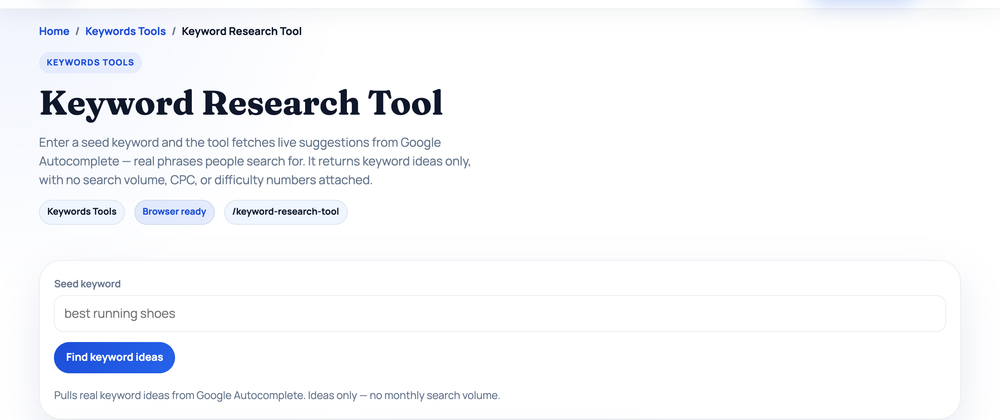
Our free Keyword Research Tool automates the autocomplete part: it queries Google Autocomplete with your seed plus every letter of the alphabet, every question word, and common modifiers, then de-duplicates and labels the results. To show you what expansion actually produces rather than assert it, here is a real run on the seed "backlinks" (checked 2026-07-17). It returned 336 keyword ideas, of which 74 were questions, 8 were comparisons, and 25 carried commercial or transactional wording. A few real rows from the output:
| Suggestion returned | Type | Likely intent |
|---|---|---|
| what are backlinks and why are they important for seo | question | informational |
| how many backlinks do i need to rank | question | informational |
| are backlinks still important in 2026 | question | informational |
| backlinks vs referring domains | comparison | commercial |
| best backlinks for local seo | modifier | commercial |
| backlinks buy online | modifier | transactional |
Two honest caveats about this data. The suggestions come from Google Autocomplete, so they are genuine searches — but the tool does not report monthly search volume or a difficulty score, and the intent labels are pattern-based heuristics, not verdicts. Treat the output as a raw idea list to be filtered by the next three steps, not as a finished plan.
Step 3: Sort by search intent
Every query has a goal behind it, and Google ranks pages that serve that goal. The four standard categories:
- Informational — the searcher wants to learn ("how many backlinks do i need to rank") → serve a guide or article
- Navigational — they want a specific site ("gmail login") → you can't usefully target someone else's brand
- Commercial — they're comparing before choosing ("best backlinks checker") → serve a comparison or honest review
- Transactional — they're ready to act ("backlinks buy online") → serve a product or service page (and note that this particular example is a link-buying query — demand you probably don't want, since paid links violate Google's spam policies)
The only reliable way to confirm intent is to search the keyword and look at what already ranks. If the first page is all tutorials, Google has decided the query is informational — a product page will not break in, however optimised. Match your page type to the SERP or drop the keyword.
Step 4: Judge difficulty — can you actually rank?
You found a phrase that fits your site and carries real demand. Before writing, one question decides whether the effort pays off: can your site realistically reach the first page for it?
Where difficulty scores come from
Paid SEO tools show a "keyword difficulty" number, say 42 out of 100. Understand what that number is: an estimate computed by the tool vendor, mostly from the backlink strength of the pages currently ranking. Google has never published a difficulty metric, which is why the same keyword can read as moderate in one tool and hard in another. Use any score as a rough first filter, never as a verdict.
What actually makes a term hard is concrete: strong, trusted sites holding the first page; ranking pages with many earned backlinks; content that is already thorough and current; results that match the intent perfectly (no gap to exploit); and SERP features — ads, featured snippets, "People also ask" boxes — pushing the organic links down so that even a good ranking earns fewer clicks.
Read the SERP yourself
The most reliable difficulty check is free: open the results page and study it. Five things to look at:
- Who ranks? All major brands, or a mix that includes small sites and forum threads? One modest site on page one is evidence the door is open.
- How strong are they? Run the ranking domains through an authority checker (demonstrated below) and compare them to your own.
- How good is the content? Thin, dated pages are an opening. Comprehensive, current pages mean you must be clearly better, not merely present.
- Does the intent fit? If the results only half-answer the query, Google is still looking for a better page — that can be yours.
- How crowded is the layout? Count the ads and boxes above the first organic result and factor that into whether the term is worth the fight.
A real authority check
Domain authority (under various names) is a third-party 0–100 estimate of a site's accumulated link strength. Our Domain Strength Checker derives its score from Open PageRank, a free link-graph metric — not Moz DA or Ahrefs DR. Here is a real comparison run through it on 2026-07-17:
| Domain | Authority (0–100, est.) | Global rank |
|---|---|---|
| example.com | 61 | #204 |
| wikipedia.org | 55 | #1,010 |
| gnu.org | 47 | #14,801 |
Notice something odd: example.com — the reserved placeholder domain that hosts a single test page — outscores wikipedia.org. That happens because decades of documentation link to example.com, and link-graph metrics count links, not usefulness. It is a built-in reminder to read authority scores as rough comparative signals between direct competitors, never as absolute quality grades. Our domain authority explainer digs into what these scores can and cannot tell you, including real scores for 89 well-known domains.
Match difficulty to your own site
Difficulty never stands alone — it only means something relative to your site's current strength. A term an established brand can win quickly might be out of reach for a new site for a long time, or forever. High volume plus high difficulty is the classic trap: everyone wants those terms, which is exactly why they are crowded, and a lower-volume keyword you can actually rank for tends to send more visitors than a big one where you're stuck on page three.
If your site is young or has few backlinks, start at the bottom of the ladder: low-difficulty long-tail phrases with clear intent. Winning those builds the topical coverage, traffic, and links that make harder terms reachable later. Starting at the top usually means ranking for nothing at all.
Step 5: Let competitors do half your research
The sites already ranking for your keywords have run years of experiments on your behalf. Studying them — not copying them — is the fastest shortcut in keyword research.
Find your real search competitors
Your search competitors are often not your business rivals. The company you lose customers to may barely appear in Google, while a blog, a forum, or a comparison site you've never considered dominates your keywords. Search five to ten of your most important terms and note which domains keep reappearing — those are your organic competitors. Sort them into direct competitors (they sell what you sell) and content competitors (publishers and bloggers who outrank you with informational pages). Both shape what you can win.
Mine their pages for content gaps
A content gap is a topic a competitor ranks for that you haven't covered at all. Gaps are where the fastest opportunities hide, because the demand is already proven — you're simply absent. Browse each competitor's site structure, blog categories, and the queries their pages obviously target, and list every topic you're missing. Feed those topics back through Step 2 as new seeds; competitor sites are one of the best seed sources there is.
Read their winning pages like a student
When a competitor outranks you, their page is telling you what satisfied searchers. Ask concrete questions: how is it structured, and how quickly does the main answer appear? How many subtopics does it cover — does it answer follow-up questions before the reader asks them? What formats does it use (tables, examples, images)? If every ranking page is a 2,000-word walkthrough and you planned a 400-word post, that gap is precisely why you wouldn't rank. Our Word Counter gives a quick depth comparison, and the Keyword Density Checker shows which terms a page leans on — useful for understanding a competitor's angle without guessing.
Their backlinks and overall strength
A competitor's backlink profile is a map of where trust lives in your niche: which publications, resource pages, and communities link to them, and what content earned it — a free tool, a data study, a definitive guide. Those formats are your blueprint for content that earns links, not a shopping list of links to replicate. Checking this requires a backlink tool that maintains its own crawl index (Ahrefs, Moz, Semrush and similar); it is the one part of this process that genuinely benefits from paid tooling. Everything else — the SERP reading, the authority comparison, the gap analysis — costs nothing.
Step 6: Group keywords into a content plan
Many keywords are variations of one underlying question. From the real run above, "what are backlinks and why are they important for seo", "how backlinks work", and "are backlinks still important in 2026" are one page, not three — a single thorough explainer can rank for all of them. Grouping variations into clusters, one planned page per cluster, is how you avoid publishing thin near-duplicates that compete with each other.
Then sort your clusters into three buckets and work them in order:
- Quick wins — low-difficulty, clear-intent long-tails your site can plausibly rank for now.
- Pillar topics — broader terms you earn over time with a strong hub page plus supporting articles linking to it.
- Aspirational — head terms to revisit once your authority has grown.
Map each cluster to one page with a primary keyword and its variations noted, and you have a publishing backlog for months — far more useful than a spreadsheet of 500 disconnected terms.
Worked example: one seed, start to finish
Here's the whole process compressed, using the real tool run from Step 2.
- Seed: "backlinks". The Keyword Research Tool returned 336 autocomplete-sourced ideas (checked 2026-07-17).
- Filter by intent. Three candidates stand out: "how many backlinks do i need to rank" (question, informational — a guide), "best backlinks for local seo" (commercial — a comparison), and "backlinks buy online" (transactional — and discarded, because selling links violates Google's spam policies; not all demand is demand you want).
- Pick one and read its SERP. Say you choose "how many backlinks do i need to rank". Open the results and apply the five checks from Step 4: who ranks, how strong they are, how deep their content goes, whether intent is fully served, and how crowded the layout is. If the first page is wall-to-wall major SEO vendors with comprehensive guides, park it in the aspirational bucket; if a forum thread or a shallow page holds a spot, it's a candidate now.
- Check the competition's strength. Run the ranking domains through the Domain Strength Checker alongside your own domain. You're looking for at least one ranking site in your own weight class — that's the realistic signal, not beating the strongest result.
- Cluster and plan. Group it with its siblings from the same run — "how backlinks work", "what are backlinks and why are they important for seo" — into one thorough explainer, and use the question-type suggestions (74 of them in this run) as your subheading candidates.
One seed, one afternoon, one well-chosen page brief backed by real queries instead of guesses.
What happens after the research
Keyword research isn't a one-time event; revisit it as you publish and learn what actually ranks for you. And the research only pays off through execution: the chosen keyword has to end up in your page's title, headings, and copy in a way that reads naturally. That craft — titles, meta descriptions, headings, internal links — is exactly what the next part covers. Continue with Part 2: the on-page SEO guide.
Sources and official references
Use these external references to verify the guidance and terminology in this article.
Frequently asked questions
Do I need paid tools for keyword research?
No. You can get far with Google autocomplete, People Also Ask, related searches, and competitor analysis. Paid tools speed things up with volume and difficulty data, but they're optional to start.
Should I target high-volume keywords?
Not at first. High-volume head terms are usually dominated by established sites. Win specific, lower-competition long-tail keywords, build authority, then move up.
How many keywords should one page target?
One primary keyword plus its close variations (a cluster). Don't create separate pages for near-identical queries — consolidate them into one strong page.