Website Management Tools

UTM Builder

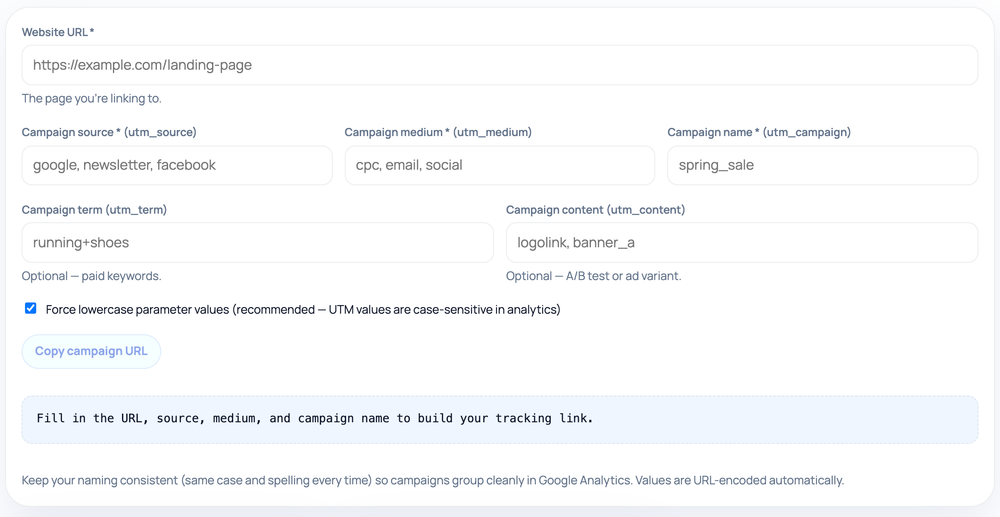
Append UTM parameters — utm_source, utm_medium, utm_campaign, and the optional utm_term and utm_content — to any link so analytics tools can attribute the traffic the click produces, with an option to force lowercase values.

Website Management ToolsBrowser ready/utm-builder
Fill in the URL, source, medium, and campaign name to build your tracking link.

Keep your naming consistent (same case and spelling every time) so campaigns group cleanly in Google Analytics. Values are URL-encoded automatically.

Step by step

How to use the UTM Builder

  1. Enter the destination page URL you want to track in the first field
  2. Fill in campaign source, medium, and campaign name (the three required fields)
  3. Optionally add utm_term and utm_content for paid keywords or ad variants
  4. Click Copy campaign URL to grab the finished tracking link
How to use the UTM Builder — tool screenshot
The UTM Builder on HighSEOTools

Pro tip: Keep the lowercase toggle on and reuse identical source/medium spellings so campaigns group cleanly in GA4.

Why tagged links exist

When someone clicks a link, analytics platforms can usually see a referrer, but referrers are coarse and often missing. UTM parameters are name=value pairs you bolt onto the destination URL so the visit arrives pre-labeled with the campaign that sent it. Google Analytics and most other tools read these five conventional keys automatically and split your traffic reports by them, turning a vague "social" bucket into named campaigns you can compare side by side.

This builder asks for the destination URL plus the five parameters and produces a single tagged link you can copy. The first three — source, medium, and campaign — are required before it outputs anything, because a tag missing any of them is of little use in reporting.

The five parameters

  • utm_source — where the click originates (newsletter, google, twitter). Required.
  • utm_medium — the channel type (email, cpc, social, referral). Required.
  • utm_campaign — the specific initiative (spring_sale, launch_2026). Required.
  • utm_term — optional, traditionally the paid-search keyword.
  • utm_content — optional, to tell apart two links in the same email or two ad variants.

How the URL is assembled

The builder parses your base URL with the browser's own URL engine, so values are URL-encoded correctly — spaces become %20 and symbols survive the trip — and the parameters are joined with the right ? and & punctuation. Because it uses the standard searchParams mechanism, each UTM key is set rather than blindly appended: if your link already carries, say, a utm_source, the builder replaces that one with your new value instead of producing a duplicate key. Any non-UTM query parameters already on the link are preserved.

There is a checkbox to force all parameter values to lowercase, which is on by default and recommended. The whole link is constructed in your browser and shown ready to copy; nothing is shortened, stored, or logged.
Conventions that keep reports clean

UTM values are case-sensitive in most analytics tools, so Email and email become two separate rows that fragment your data. The lowercase option exists precisely to prevent that — leave it on and your casing stays consistent automatically. Beyond case, keep a steady vocabulary for mediums (decide once whether paid search is cpc or ppc, and stick to it) so your default channel grouping classifies traffic correctly. Pick clear, human-readable campaign names you will still recognize in a report months later.

Because these tags are visible in the address bar and get shared, copied, and indexed, never put anything private or personally identifying in them.

Common mistakes

  • Inconsistent casing or spelling (Facebook vs facebook, email vs e-mail) that splits one channel into several rows — the lowercase toggle fixes the case half of this.
  • Tagging internal links between your own pages, which overwrites the original campaign attribution and starts a new session.
  • Putting an email address, coupon code, or other private data into a parameter where it becomes publicly visible.
  • Mixing up source and medium — source is the specific origin, medium is the broad channel type.
  • Inventing new medium values per campaign instead of reusing a small, fixed set.

Privacy and limitations

The link is built entirely client-side; your URLs and campaign names are not sent to any server. That said, UTMs only describe where a click came from — they do not measure conversions, revenue, or anything that happens after the visit; that is your analytics platform's job once the tagged visits arrive. They also rely on the parameters surviving the journey, so avoid intermediaries that strip query strings, and remember a tagged link is just a normal URL that anyone can edit or reuse.

Worked examples

See it on real input

Tagging a newsletter link

Input: Base: https://example.com/sale / source=newsletter, medium=email, campaign=spring_sale

Output: https://example.com/sale?utm_source=newsletter&utm_medium=email&utm_campaign=spring_sale

Add utm_content=top_banner to separate this link from another in the same email.

A value with a space (and lowercasing on)

Input: Base: https://example.com/sale / source=newsletter, medium=email, campaign=Spring Sale 2026

Output: https://example.com/sale?utm_source=newsletter&utm_medium=email&utm_campaign=spring+sale+2026

The value is lowercased, and each space is encoded as + — the standard query-string encoding the browser's URL API emits. Analytics platforms decode + back to a space.

A base URL that already has a query string

Input: Base: https://example.com/p?id=42 / source=twitter, medium=social, campaign=launch

Output: https://example.com/p?id=42&utm_source=twitter&utm_medium=social&utm_campaign=launch

The existing id=42 is kept; the UTM keys are added with &.

FAQ

UTM Builder — what people ask

Which parameters are mandatory?

utm_source, utm_medium, and utm_campaign are required before the tool outputs a link, since they are the working minimum analytics tools expect. utm_term and utm_content are optional and used for finer breakdowns.

Does case matter in the values?

Yes. Most analytics platforms treat Facebook and facebook as different sources. Keep the lowercase option on to standardize casing automatically across every campaign.

What if my link already has a query string or a UTM tag?

Existing non-UTM parameters are preserved. A UTM key that is already present is replaced with your new value rather than duplicated, because the tool sets parameters by name.

Should I tag internal links between my own pages?

No. Internal UTM links overwrite the original campaign attribution and start a new session, distorting your data. Use them only on links pointing into your site from outside.

Are spaces and symbols handled for me?

Yes. The builder URL-encodes every value, so spaces, ampersands, and other characters are escaped and the parameter stays intact when clicked.

Is my data sent anywhere?

No. The link is assembled in your browser. Your destination URL and campaign values are never uploaded, shortened, or logged.

Site standards

How HighSEOTools handles data and methodology

Our editorial and data-source notes explain how each check works and where estimates come from.