Website Management Tools

Twitter Card Generator

Produce the Twitter Card meta tags — summary or summary_large_image — that decide how your link appears on X, and watch a live X preview card update as you type so you can see the layout before you publish.

Website Management ToolsBrowser ready/twitter-card-generator
<meta name="twitter:card" content="summary_large_image">
Step by step

How to use the Twitter Card Generator

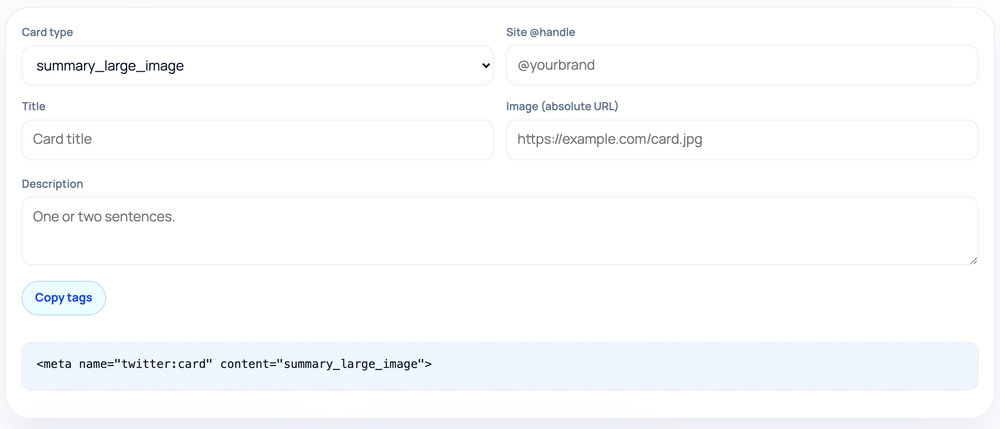
  1. Choose card type: summary_large_image for a big image or summary for a compact thumbnail.
  2. Add your site @handle, title, absolute image URL, and description.
  3. Watch the live X (Twitter) preview card update as you type — the layout switches with the card type.
  4. Click Copy tags and paste the generated twitter:card tags into your page's <head>.
How to use the Twitter Card Generator — tool screenshot
The Twitter Card Generator on HighSEOTools

Pro tip: Use summary_large_image with a 1200x628 image for the highest-impact link previews on X.

Two card styles, one decision

X renders shared links using Twitter Card markup, and the first choice you make is the card type. A summary card shows a small square thumbnail beside the text; summary_large_image shows a wide banner above it, which draws far more attention in a busy timeline.

This generator writes whichever you pick, along with the title, description, image, and an optional site handle. It is built for X specifically, where the dedicated twitter: namespace gives you tighter control than relying on Open Graph fallbacks alone.

How the markup is generated

You select the card type and fill in the text, image, and handle fields; the tool assembles the matching twitter:card, twitter:site, twitter:title, twitter:description, and twitter:image tags. A live X preview card renders alongside the tags and switches layout with the card type — a wide banner for summary_large_image or a left-hand thumbnail for summary — so you see the result before publishing. It all happens in your browser, with no upload step and no data sent off the page.

The card type you choose is written verbatim into twitter:card, since that single value tells X which layout to draw. The site handle is normalized for you: if you type yourbrand without the @ symbol, the tool adds it so the twitter:site value is correctly formatted as @yourbrand. Only the fields you complete are emitted, apart from twitter:card which always appears.

Where you would use it

  • Turning a plain link into a wide-image card for a launch or campaign post
  • Adding a compact summary card to a link where the text matters more than the image
  • Attributing cards to your brand account with a twitter:site handle
  • Giving X tighter control than your Open Graph tags alone provide
  • Producing a tag block to pair with the Open Graph Generator for full coverage

Image and length reminders

For summary_large_image, supply a wide image (roughly 1200x628 works well) so the banner is not upscaled and blurry; for a basic summary card a square image around 240x240 or larger is enough. Use an absolute https:// URL and host it somewhere reliably public.

Keep the title short and the description tight — X trims long text in the card. The generator does not enforce these limits, so trim the copy yourself before shipping, and make sure the wording matches the page so the card does not feel like bait.

Common mistakes to avoid

Choosing summary when you wanted a banner is the most common slip; a wide-image post then collapses into a small thumbnail. Pointing twitter:image at a relative path or a private file is another, because the scraper cannot reach it.

People also forget that X caches previews, so a fixed tag may still show the old card until it is re-scraped. And relying solely on Twitter Cards leaves every other platform — Facebook, LinkedIn, Slack — without a card, which is why pairing with Open Graph matters.

Honest limits

The tags make a page eligible for a particular card style and supply its content, but X decides at render time whether and how to display the card, and it applies its own cropping and caching. The generator cannot guarantee a specific on-screen result.

It writes exactly what you enter without checking character counts, confirming the image loads, or verifying the markup survives your CMS. Validate the final card with X's own card tooling after deployment. Privacy note: the card type, handle, text, and image URL all stay in your browser and are never transmitted.

Worked examples

Form fields in, live card out

A large-image card for a launch post

Input: Card type: summary_large_image | Site handle: yourbrand | twitter:title: Meet our new pricing | twitter:description: Simpler plans, same features, lower entry price. | twitter:image: https://example.com/img/pricing-card.png

Output: <meta name="twitter:card" content="summary_large_image"> plus <meta name="twitter:site" content="@yourbrand"> and matching twitter:title, twitter:description, and twitter:image tags, producing a wide banner preview on X.

The handle is normalized to @yourbrand automatically.

A compact summary card

Input: Card type: summary | twitter:title: Weekly SEO digest | twitter:image: https://example.com/img/square.png

Output: <meta name="twitter:card" content="summary"> with twitter:title and twitter:image tags. The description and site lines are omitted because those fields were left blank.

A square image suits the small thumbnail a summary card shows.

FAQ

Questions we get about Twitter Card Generator

Do I still need Open Graph tags as well?

It helps. X can read og: tags as fallbacks, and other platforms rely on them entirely. Generate both for the broadest, most consistent previews.

Which card type should I use?

Use summary_large_image for posts where a strong visual matters, and summary for compact links where the image is secondary to the text.

Do I have to type the @ in the site handle?

No. If you enter the handle without the @, the tool adds it for you, so twitter:site always comes out correctly formatted as @yourbrand.

Why is my image not showing on X?

Common causes are a non-public image URL, a file too small for the chosen card, or a cached preview. Confirm the image loads at its absolute URL, then re-scrape the link.

Does the tool check my character counts?

No. It writes the tags as entered. X may truncate long titles or descriptions, so keep the copy concise yourself before publishing.

Are my inputs sent anywhere?

No. The generator runs entirely in your browser, so the card type, handle, text, and image URL never leave the page.

Site standards

How HighSEOTools handles data and methodology

Our editorial and data-source notes explain how each check works and where estimates come from.