Website Management Tools

Open Graph Generator

Generate the og: tags — title, type, url, image, description, and site name — that control how a link looks when it is shared, and watch a live Facebook / LinkedIn preview card update as you type so you can see the result before you publish.

Website Management ToolsBrowser ready/open-graph-generator
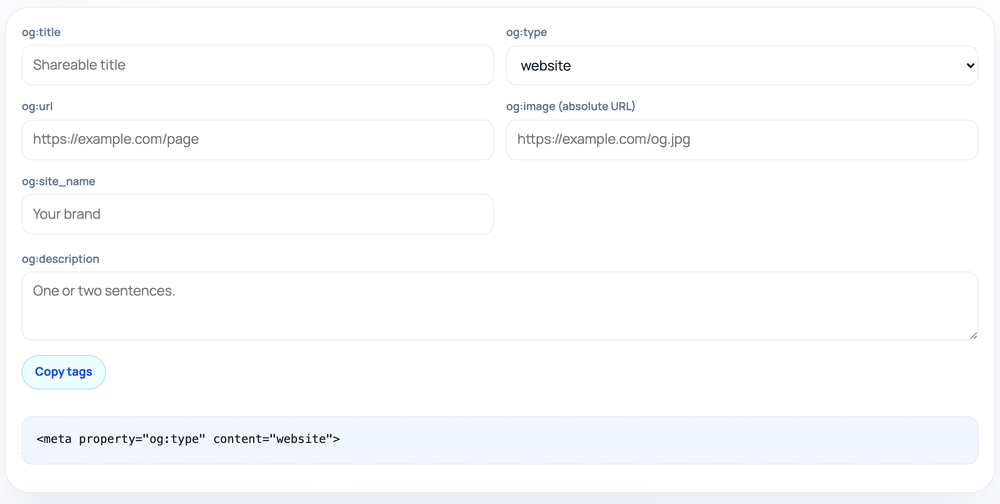
<meta property="og:type" content="website">
Step by step

How to use the Open Graph Generator

  1. Fill og:title, then pick og:type (website, article, product, or profile).
  2. Enter og:url, an absolute og:image URL, site name, and description.
  3. Watch the live Facebook / LinkedIn preview card render exactly how your link will look when shared.
  4. Click Copy tags and paste the generated tags into your page's <head>.
How to use the Open Graph Generator — tool screenshot
The Open Graph Generator on HighSEOTools

Pro tip: Always use a full absolute og:image URL (https://...), not a relative path, or the preview won't render.

Why Open Graph exists

Open Graph is the protocol Facebook introduced so that a shared link could render as a card — a headline, a blurb, and a thumbnail — instead of a bare URL. Most other platforms and messengers, from LinkedIn to Slack to WhatsApp, later adopted the same og: tags, so getting them right pays off almost everywhere a link is shared.

Without these tags, platforms guess at your preview by scraping whatever heading and image they can find, and the result is often the wrong picture, a truncated title, or no card at all. A small block of explicit og: tags replaces that guesswork with the exact title, description, and image you intend.

How it builds the tags

You enter up to six values and the tool wraps each one in the correct property syntax, producing a block you paste into the page head. As you type, a live Facebook / LinkedIn preview card renders your image, title, description, and domain exactly as the share unit will look, so you can catch a truncated title or a missing image before it ever goes live. The whole process runs client-side in your browser; your inputs never leave the page.

The fields are og:title, og:type, og:url, og:image, og:description, and og:site_name. The og:type field decides how platforms categorize the link — website for a normal page, article for a post, product for a commerce page, or profile for a person. The og:url is the canonical address the share should resolve to even if it was shared from a tracking link, and og:site_name is the human-readable name of your overall site that some cards display above the title. Only the fields you fill in are written, with og:type always included since it has a sensible default.

Where you would use it

  • Adding a proper share card to a page that currently previews as a bare link
  • Setting an article-type card for a new blog post or news story
  • Giving a product page a controlled title, image, and description for shares
  • Defining a consistent og:site_name across a brand's pages
  • Producing a baseline block you then extend with Twitter Card tags

Practical notes on the image

The single field that breaks most often is og:image. Platforms cache the first image they fetch, so if you ship the wrong one and fix it later, the old thumbnail can linger until the cache clears or you force a re-scrape in the platform's own debugger.

Use an absolute URL starting with https://, keep the image close to a 1.91:1 ratio such as 1200x630, and host it somewhere reliably public. This generator writes the tag; it does not upload, resize, or validate the file, so confirm the image actually loads at its URL before you rely on it.

Common mistakes to avoid

Using a relative image path is the most frequent error — scrapers need the full https:// URL, not /images/og.jpg. Choosing the wrong og:type is another, since a profile or product type on an ordinary article can change how some platforms frame the card.

Pointing og:url at a tracking or campaign URL rather than the clean canonical address splits engagement signals and can show searchers a messy link. Finally, mismatching the og:title against the visible page can read as bait-and-switch to users who click through.

Honest limits

These tags govern eligibility and content for a card, not whether a specific platform chooses to render one or how aggressively it crops the image. Each network applies its own layout and caching rules on top of the tags you provide.

The tool also writes exactly what you type without verifying that the URL or image resolves, that the page exists, or that the markup survives your CMS. Treat the output as a clean starting point and confirm the live result with a sharing debugger. Privacy note: every value stays in your browser and is never sent to a server.

Worked examples

Tags in, share card out

Tags for an article share

Input: og:title: The 2026 Guide to Core Web Vitals | og:type: article | og:url: https://example.com/guides/core-web-vitals | og:image: https://example.com/img/cwv.png | og:description: What LCP, INP, and CLS mean and how to improve each one. | og:site_name: Example

Output: <meta property="og:title" content="The 2026 Guide to Core Web Vitals"> followed by matching og:type="article", og:url, og:image, og:description, and <meta property="og:site_name" content="Example"> tags.

Six inputs, six correctly-formatted property tags.

A minimal website card

Input: og:title: Acme Tools | og:type: website | og:url: https://acme.example | og:image: https://acme.example/og.png

Output: Four tags: og:title, og:type="website", og:url, and og:image. The description and site_name lines are omitted because those fields were left empty.

Empty fields are skipped, so the block stays clean.

FAQ

Open Graph Generator: common questions

Is Open Graph the same as Twitter Cards?

They overlap but differ. X can fall back to og: tags, yet dedicated twitter: tags give finer control. For full coverage, pair this with the Twitter Card Generator.

What should og:type be for my homepage?

Use website for a homepage or general landing page, article for individual blog posts or news stories, product for commerce pages, and profile for a person's page.

What does og:site_name do?

It supplies the human-readable name of your overall site, which some platforms show as a small label above or below the card title. It is optional but helps brand the preview.

My preview still shows an old image. Why?

Platforms cache scraped images aggressively. The tag is correct once generated; you usually need to re-scrape the URL in the platform's own sharing debugger to refresh it.

Does this tool host my image?

No. You provide a public image URL and the tool references it in og:image. Hosting the file is up to you, and the URL should be absolute and start with https://.

Do empty fields create blank tags?

No. Apart from og:type, which always appears, the tool only writes a tag for a field you actually fill in, so you never get empty content attributes cluttering the block.

Site standards

How HighSEOTools handles data and methodology

Our editorial and data-source notes explain how each check works and where estimates come from.